

Summarizer is a BetterDiscord plugin that generates summaries of articles and videos linked on Discord. Select from a wide variety of LLM models to get concise and informative summaries.

- [x] Generate summaries for articles and YouTube videos using the most recent LLM models
- [x] Select between multiple AI providers and LLM models
- [x] Customizable system prompts and message responses through templating
- [x] Support for proxies to improve access to web content
- [x] Mitagate webpage content access restrictions by forwarding request through proxies
- [x] Periodic model list retrieval from AI providers
- [x] Rewrite summaries using different AI models
- Ensure you have BetterDiscord installed. If not, download and install it from BetterDiscord's official website.
- Download the
Summarizer.plugin.jsfile from the official repository or BetterDiscord plugin repository (coming soon). - Navigate to your BetterDiscord plugins folder. You can find this folder by going to User Settings > Plugins > Open Plugin Folder within Discord.
- Drag and drop the
Summarizer.plugin.jsfile into the plugins folder. - Enable the Summarizer plugin from the BetterDiscord plugins tab.
To use the Summarizer plugin, you need to provide an API key for the AI provider. Follow these steps to configure the plugin:
- Go to User Settings > Plugins.
- In the settings panel, enter your API key for the selected AI provider (e.g., Google Gemini).
- For Google Gemini, you can get an API key by visiting [Google AI Studio](https://cloud.google.com/).
- For Groq, you can get an API key by signing up for GroqCloud.
- Choose the desired AI model from the dropdown list.
- Edit the system prompt, summary template and output template to your liking.
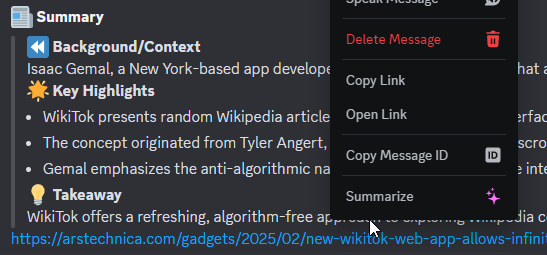
Once Summarizer is installed and configured, it will automatically detect article links in Discord messages. When a message contains a link, you will see a "✨ Summarize" button in the message context menu (right-click on the message).
Click on the "✨ Summarize" button to generate a summary of the linked article. The message will be edited to include the summary using your template.
### 📰 Summary
Contributions are welcome! If you'd like to contribute, feel free to fork the repository and submit a pull request.
If you encounter any issues or have suggestions for improvements, please open an issue.
Special thanks to RoyRiv3r for testing the plugin and providing valuable feedback.
This project is licensed under GPLv3 - see the LICENSE file for details.
Summarizer is not affiliated with Discord or any of the platforms it supports. All product names, logos, and brands are property of their respective owners.